How I format my long form entries for my Micro.blog feed in Hugo
I got a question from pratik on how I make my entries appear like this in the Micro.blog timeline:
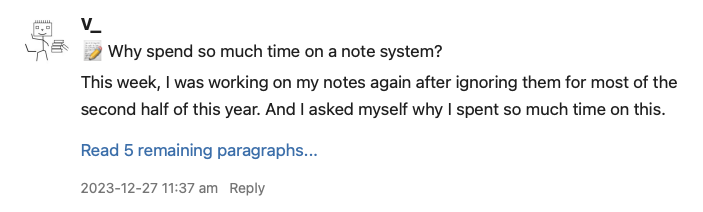
I don’t host my blog directly on Micro.blog, so I have a special feed to integrate my posts into my Micro.blog timeline. This feed is here, and it uses the JSON Feed format. A single entry looks like this:
{
  "id": "https://vmac.ch/posts/2023-12-27-why-spend-so-much-time-on-a-note-system/",
  "title": "📝 Why spend so much time on a note system?",
  "URL": "https://vmac.ch/posts/2023-12-27-why-spend-so-much-time-on-a-note-system/",
  "content_html": "<h2>📝 Why spend so much time on a note system?</h2>\n<p>This week, I was working on my notes again after ignoring them for most of the second half of this year. And I asked myself why I spent so much time on this.</p>\n\n\n\n\n<p><a href=\"https://vmac.ch/posts/2023-12-27-why-spend-so-much-time-on-a-note-system/\">Read 5 remaining paragraphs...</a></p>",
  "tags": [
   "note-taking"
  ],
  "date_published": "2023-12-27T11:37:00+01:00",
  "date_modified": "2023-12-27T11:37:00+01:00"
}
The important part to note is the content of the content_html property, which contains an HTML preview version. This includes the title of the post as well. This JSON shows the title of the post and the post summary, which is usually the first paragraph of my post.
I created the content with the following Hugo partial. I’m also using Hugo for my blog like it is used on Micro.blog:
{{- $section_heading := .Site.GetPage "section" .Section -}}
{{ if ge (.Title | len) 0 }}<h2>{{ if ne .Section "posts"}}{{$section_heading.Title}}: {{ end }}{{ .Title }}</h2>{{ end }}
{{ .Summary }}

{{ $total_paragraphs := sub (split .Content "<p>" | len) 1 }}
{{ $excerpt_paragraphs := sub (split .Summary "<p>" | len) 1 }}
{{ $remaining_paragraphs := sub $total_paragraphs $excerpt_paragraphs }}
{{if ge $remaining_paragraphs 0 }}<p><a href="{{.Permalink}}">Read {{ $remaining_paragraphs }} remaining paragraphs...</a></p>{{ end }}
The second and third lines are what generate the title and summary output. Lines five to the end calculate the number of paragraphs remaining in the post. And output the link if needed. .Content contains the HTML code of the post, so I can check how many p tags it contains.
I call the above partial then like this in the layout, which generates the JSON feed (this is simplified and part pseudo-code):
LOOP OVER ALL POSTS
  IF LONG-FORM-POST THEN
    {{- $html := partial (printf "%s%s" "post_types/" .Params.layout) . }}
    "content_html": {{ $html | jsonify }},
  END IF
END LOOP
This is in a layout file for a custom outputFormats to generate the JSON output instead of regular HTML. The config for the format looks like this:
[outputFormats.jsonfeed]
  mediaType = "application/json"
  baseName = "feed"
  isPlainText = true
This means the layout file with the loop above needs to be called index.jsonfeed.json and placed inside Hugo’s layouts/ directory.
I use the same partial for formatting the post summary and also for my regular index page; it is just called from a different index file in this case. The styling inside of Micro.blog only sometimes works, and I never found out when exactly it stops working. I suspect it happens when the content_html is longer than the character limit, but I’m never sure if it counts the HTML tags and links. I guess it is not counting them; otherwise, it gets too long too early. I never tested it thoroughly. I usually try to keep the summary as short as possible.
Comments
How to respond
Write your comment on your on page and link it to this page with the following link:
https://vmac.ch/posts/2023-12-29-how-i-format-my-long-form-entries-for-my-micro-blog-feed-in-hugo/
Then insert the permalink to your post into the form below and submit it.
Alternatively you can reach me by email to: comment@vmac.ch