How to slim down your Hugo homepage into an archive and a live page
My homepage deploy script stopped working at the end of January. The Hugo content folder is now over 4 GB in size and this causes quite long build times. But the bigger issue is the checkout time and the actual time required to deploy the final page after the GitHub Action build has completed. The whole issue is made more complicated as I’m unable to run Hugo directly on my webhost. So each time I trigger a new build the build process copies the entire public folder, which takes up to 30 minutes. And then it often runs into a caching or timeout issue on my webhost, leading to the page not updating for up to 12 hours. I never found out what the actual issue was. So it was time to find a solution for these problems. I had already run into this situation a year ago and managed to patch it, but I was never happy with the overall build process. This time I want to fix the problems once and for all.
For this I need to fix the following issues:
- Drastically reduce repository/content folder size and thereby shorten build and deploy times
- Fix the timeout/caching on deploy, so the builds are stable again
- Speed up the deploy step: Ideally only upload what is new
One obvious solution for my webhost would be to not use Hugo at all. I learned that Hugo works best when the build happens on the same system where the webserver lives. But that was not an option I was interested in. I like the Hugo setup, and I did not want to migrate the full site with all posts.
Split the Hugo Site into Archive and Main
Having already tried to optimize the size of the content folder, I knew this would not help much. I could gain some time by doing another slimming round, but since it only took around eight months to end up in the same situation again, this would not be a long-term solution. If I invest the effort again, I want it to result in something sustainable.
So the solution I came to was to split my page into two Hugo instances. This is not a process Hugo supports out of the box, but the structure of my page made it possible to implement.
I kept the old repository (the big one) and it is now the home of my archive-page Hugo instance. And I created a new repository and Hugo instance which contains the active part of my homepage (main-page). I only ever post to the main-page going forward. So there are no build scripts needed for the archive-page, so I moved the GitHub Actions over to the new repository.
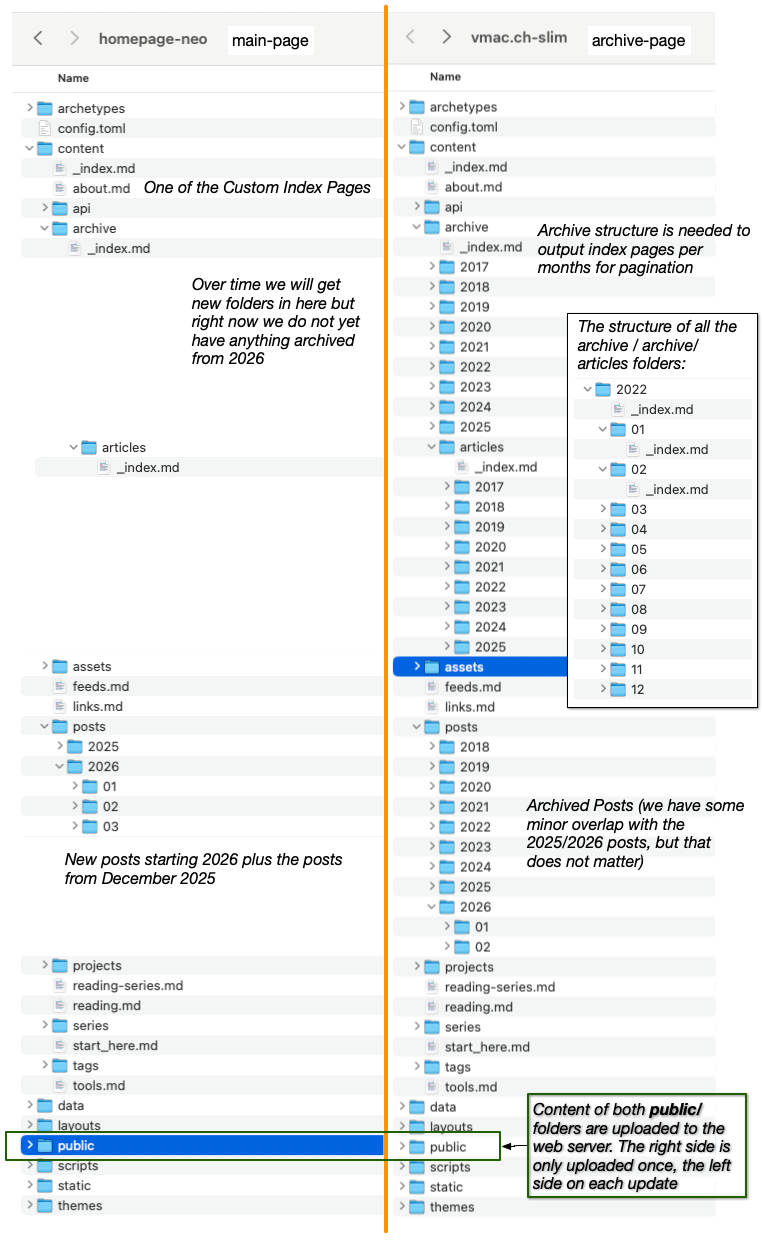
I implemented the following changes in both Hugo instances but the archive-page was only built and uploaded once to the webhost. And the assumption is that the new instance can override all the index pages and if not the webserver will serve the one from the initial archive build.
Pagination
For this new setup to work correctly I could no longer use Hugo’s native pagination. The native pagination just splits after every N posts, and this causes the posts to move to different pages each time I post anything new. The main requirement in pagination I needed for the new system is that the generated pages are stable over time / new builds. So I can build the pages for the archive once and later just add on for the new posts. Never needing to change or overwrite the older pages.
For this I switched to a date based pagination system (one page per month). My homepage now shows the last 20 posts by default (configurable via a custom config archive_rolling_window) and after that we get one page per month for which we have posts. And to not have a totally empty index page on my blog I moved the 20 newest posts from the archive page into the new setup. So the split is not directly on the end of 2025.
To correctly create the archive page I needed to add a new category to the content directory in the archive-page only. I generated this folder structure once, one _index.md file per month for which we have posts. And a special layout which then renders the archive months overview pages. This step was needed as there is no simple way to output multiple page structures from a single Hugo category and I did not want to destroy the regular posts rendering in the archive-page.
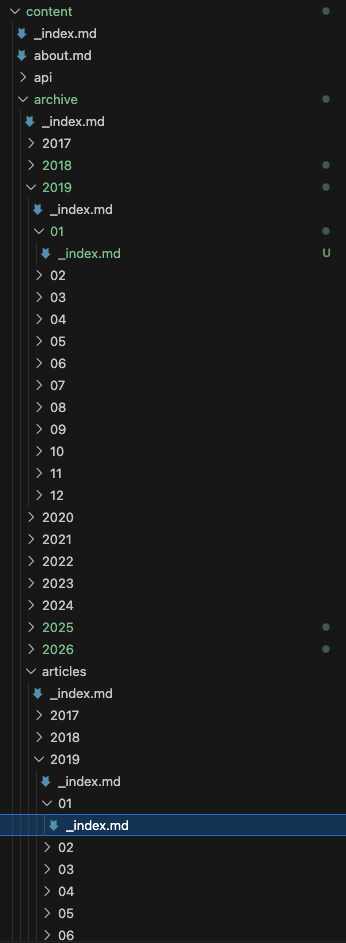
The partial renders month-based archive pagination with a fixed sliding window of five entries. It builds a list of months from archived content, validates them against existing pages, and sorts them in descending order. It determines the current month from the URL and centers the navigation window around it. Additionally, it provides navigation controls to jump to the newest (HOME), previous, next, and oldest archive entries.
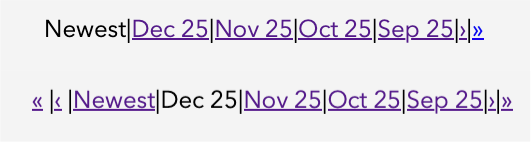
Here is an example on how the pagination partial is used (in this case for the articles index page):
    <section>
    {{ partial "archive-month-navigation.html" (dict "archived" $archived "rollingWindow" $rollingWindow "context" . "basePath" "archive/articles" "homePath" "/articles.html" "extraMonths" (slice
  "2023/12"
  "2023/11"
  "2023/10"
  "2023/09"
  "2023/08"
  "2023/07"
  "2023/06"
)) }}
</section>
The implementation handles sparse data, missing months, boundary conditions, and even allows virtual months via its configuration which is used to preseed it with data in cases where no posts are present in the main-page and all data is in the archive-page only. You can take a look at the full partial here: archive-month-navigation.html.
Rel URL Shortcode
The next problem to fix was my usage of the rel-url-shortcode in the main-page. This was relevant for my special pages like start-here or the about page. As not all posts I want to link to are present in the source now, the native shortcode fails (on build) as it is unable to find the reference. So I create my own shortcode which checks if it can use the rel version or should just use the absolute url instead. The new shortcode is called smartref and is a drop in replacement for the hugo one.
    {{- $archiveCutoff := site.Params.archiveCutoff | default 2026 -}}

{{- $input := .Get 0 -}}

{{- /* Normalize path */ -}}
{{- $path := strings.TrimPrefix "/" $input -}}
{{- $path = strings.TrimSuffix ".markdown" $path -}}
{{- $path = strings.TrimSuffix ".md" $path -}}

{{- /* Extract year from posts/YYYY/... */ -}}
{{- $parts := split $path "/" -}}
{{- $year := 0 -}}

{{- if ge (len $parts) 2 -}}
  {{- $year = index $parts 1 | int -}}
{{- end -}}

{{- if ge $year $archiveCutoff -}}
  {{- relref . (printf "%s.md" $path) -}}
{{- else -}}
  {{- printf "/%s/" $path | relURL -}}
{{- end -}}
Custom Index Pages
After splitting the site, my custom index pages stopped working. They rely on aggregating data across all posts, but my previous implementation assumed a single content/posts directory. With the content now split, these indexes no longer had access to the full dataset and returned incomplete results.
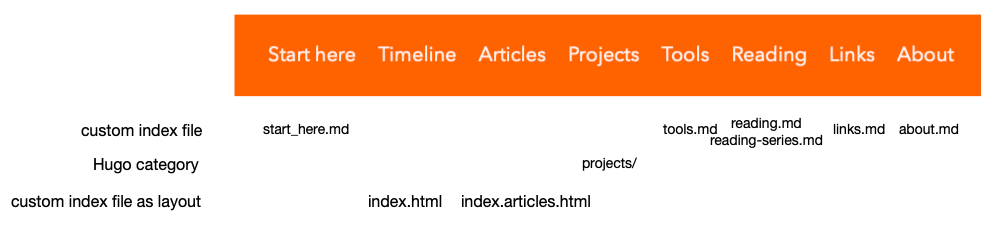
As you can see in the drawing above we have two different types of custom index pages:
- Page based on a named markdown file (like
about.mdorreading.md), these files use some custom shortcodes I made which find the relevant data from thecontent/postsdirectory. - Custom indexes with special layouts (like the main blog index page or the articles page). These also filter the relevant data from the
content/postsdirectory. - And then we have one single additional category for the projects.
Don’t ask why I did not use the regular Hugo tools when I first made my homepage. At some point I will need to fix this and use categories for all post types, it would make my setup so much simpler. But this was not the goal of this refactor and I did not want to have any more scope creep so I adjusted the layouts and shortcodes to work with the new setup. The main adjustment was adding support for the new pagination style. And adding support for when the rolling window is not fully populated by posts from the main-page (this happens in the articles list), but also in the about and reading sections.
The main shortcode I use is called tagarticles (tagarticles.html) and it returns a styled list of posts with the given tag. This is used like here (an example from the reading.md page):
    ## End of year reading summary
{{< tagarticles "books-read" >}}
[
  {"url":"/posts/2022/2022-12-31-books-in-2021/","title":"Books read in 2022","date":"2022-12-31T15:41:00+01:00"},
  {"url":"/posts/2021/2021-12-31-books-in-2021/","title":"Books read in 2021","date":"2021-12-31T11:32:00+01:00"},
  {"url":"/posts/2020/2020-12-31-books-in-2020/","title":"Books read in 2020","date":"2020-12-31T17:39:00+01:00"},
  {"url":"/posts/2019/2019-12-31-books-in-2019/","title":"Books read in 2019","date":"2019-12-31T16:34:00+02:00"},
  {"url":"/posts/2018/2018-12-31-books-in-2018/","title":"Books read in 2018","date":"2018-12-31T12:42:00+00:00"}
]
{{< /tagarticles >}}
The relevant part is that the body of the shortcode contains an array of archived posts which are not present on the main-page anymore, and the shortcode combines these with the posts from the content/posts directory into a single list, which is then sorted by publish date. Duplicate data is not an issue here, as we assume that archived posts are not returned by the regular Hugo mechanism.
Improve Deployment Process
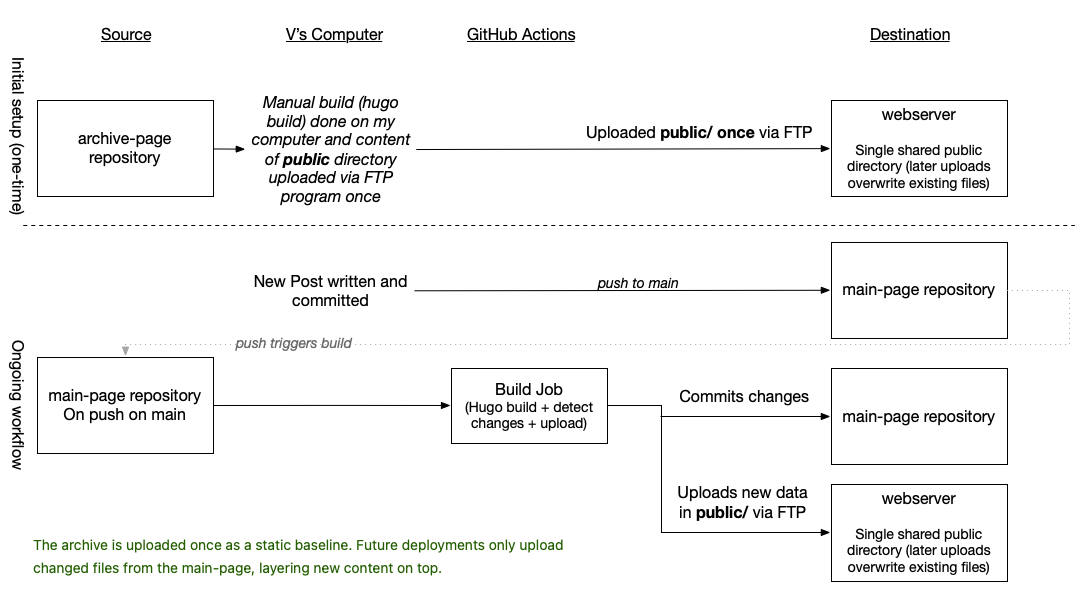
The next optimization is the GitHub workflow (build.yml). Publishing via Git is no longer an option due to caching and timeout issues on my webhost. I was never able to fully diagnose the exact cause, but as the site grew larger, Git-based deployments became unreliable and would often fail or time out. Since Hugo always builds the entire site from scratch, the amount of data uploaded to the webhost on each deploy grew too big. What I needed instead was an iterative build process that only updates the changed parts of the site. So my build script is split into six main steps:
- Checkout Repository
- Update archive pages
- Detect files which are new and need to be uploaded later (saved to
changed_files.txt) - Hugo Build and commit step (I still commit the built page to my repository)
- Upload changes files via
lftpto my webhost - Notify Micro.blog about the update
Please note that the Hugo build itself is still the same (a full rebuild of the main-page) but around that I have additional logic to identify the relevant changes. The important part and the special sauce of my new setup is the second, third and fifth steps:
- name: Update archive tree
 run: |
   ./scripts/update-archive-dirs.sh
The called script (update-archive-dirs.sh) checks all posts in content/posts and updates the tree structure in content/archive so that Hugo knows which archive index pages it needs to generate.
Important: This step only creates archive index pages for the main-page. The necessary archive index pages for the archive-page must already exist. I created these manually and uploaded them to the webhost once. Without this, the pagination for the archive section would not work.
This script is therefore the second part required to get the month-based pagination working.
# -------------------------------------------------
# Detect files that will change
# -------------------------------------------------
- name: Detect files to upload
 run: |
   ./scripts/detect-changed-public.sh --debug > changed_files.txt

   echo "Files detected:"
   cat changed_files.txt
For the uploading we first create a temporary file (lftp.txt) with a script for lftp:
- name: Build lftp script
 run: |
   echo "open -u \"$FTP_USER\",\"$FTP_PASS\" \"$FTP_HOST\"" > lftp.txt

   echo "set ftp:ssl-force true" >> lftp.txt
   ...
   echo "set cmd:trace true" >> lftp.txt

   while IFS= read -r file; do
     dir=$(dirname "$file")
     echo "mkdir -p \"$FTP_BASE_PATH/$dir\"" >> lftp.txt
     echo "put \"public/$file\" -o \"$FTP_BASE_PATH/$file\"" >> lftp.txt
   done < changed_files.txt

   echo "quit" >> lftp.txt
Which we then give to the glazrtom/ftp-action@v3.0.0 action which does the actual uploading:
- name: Upload via FTP
  uses: glazrtom/ftp-action@v3.0.0
  with:
    host: ${{ secrets.FTP_HOST }}
    user: ${{ secrets.FTP_USER }}
    password: ${{ secrets.FTP_PASS }}

    command: "source lftp.txt"
    options: ""
    localDir: ""
    remoteDir: ""
We must set the options, localDir, and remoteDir to empty strings so that the script works correctly. All arguments need to be set inside the script.
We also need to specify the host, user, and password twice. The GitHub Action requires these parameters, but it does not reuse them inside the script itself. As a result, the script runs without an active connection unless we explicitly reconnect. Therefore, the first line in the script (open ...) establishes the actual connection to the webhost.
The last part is the bash script used to determine the delta of changed files. The script uses a heuristic to detect which files need to be uploaded. This works for all posts I have written so far, although I have already had to adjust it a couple of times as new edge cases appeared.
This approach works well because my microposts and regular posts follow a strict structure. I generate them via a custom app, so the layout is always consistent.
The script first detects changes in the content/posts directory. It then compares a set of hardcoded output files against the state of the previous build (.hugo-extra-output-manifest). Additionally, some files are always included in each build (defined in the GLOBAL_OUTPUTS array).
I do not show the full script here (it is quite long), but you can download it here: detect-changed-public.sh. The most relevant part is the EXTRA_OUTPUTS array, which defines expected output files in the public folder along with rules that determine when they should be considered changed:
- Content change (tracked via
.hugo-extra-output-manifest) - New posts in
content/postsmatching specific tags - New posts in
content/postsmatching specific categories - New
_index.mdfiles incontent/archive/**
Any of these rules will cause the file to be emitted as changed and included in the upload.
#!/usr/bin/env bash

GLOBAL_OUTPUTS=(
 "index.html"
 "index.xml"
 ...
 "sitemap.xml"
)

EXTRA_OUTPUTS=(
 "reading/index.html|content/reading.md|tags=book-start,books-read,review|categories=book-start"
 ...
 "start_here/index.html|content/start_here.md"
 "index.html,index.xml|content/archive/**/_index.md|include-parents"
)
Summary
With all of these changes I was able to get the build time to under 1 minute, and so far I have not noticed any strange caching artefacts on my webhost. By adding the XML-RPC ping call to the GitHub Action, it now also notifies Micro.blog about updates directly, so new posts are visible there immediately.
It took a while to come up with this solution, and if you are at the beginning of your Hugo journey, I would strongly recommend using Hugo’s taxonomy system properly and organizing your posts by category—not like I did. Keeping all posts in a single directory is not worth going against the system. It would have made splitting the homepage into two Hugo instances much simpler and avoided a lot of the custom logic (around my index pages) I had to introduce.
Perhaps I will do a full refactor at some point, but not right now. At the moment I’m just glad I got the build times down and found such a “simple” solution. Alternatively, I could also pay more for my webhost and build directly on there.
Comments
How to respond
Write your comment on your on page and link it to this page with the following link:
https://vmac.ch/posts/2026-04-04-split-hugo-homepage/
Then insert the permalink to your post into the form below and submit it.
Alternatively you can reach me by email to: comment@vmac.ch